
Which Building Access Control Systems Fit Your Facility?
The right building access control systems should do more than unlock doors. They should help facility managers decide who may enter, which areas they may access, when that permission is valid, and how every access event can be reviewed later. For commercial buildings and industrial sites, this level of control is especially important because a single facility may contain offices, warehouses, production areas, server rooms, electrical rooms, loading zones, and outdoor equipment cabinets with very different security requirements.
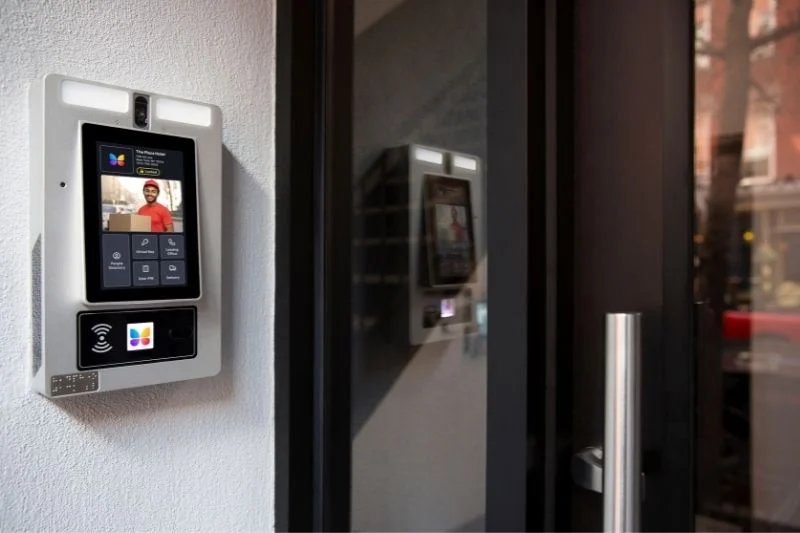
A system that works well for a small office may not be suitable for a factory, logistics center, data facility, power site, or multi-building campus. Purchasing managers therefore need to look beyond the reader mounted beside the door. Credential management, lock durability, software control, emergency procedures, installation conditions, integration options, maintenance workload, and long-term operating costs all influence whether a system will remain practical after deployment.
Why Building Access Control Systems Matter
Building access control systems reduce the uncertainty created by uncontrolled mechanical keys. In a traditional key system, facility managers may know who originally received a key, but they cannot always confirm who currently holds it, whether it has been copied, or when it was used. When an employee, contractor, or temporary worker leaves, recovering every physical key can become difficult. Rekeying multiple doors adds cost and may interrupt daily operations.
Electronic access management changes the process from key distribution to permission management. Instead of relying only on possession of a physical key, the organization defines access according to a person's role, work schedule, assigned area, or temporary task. A maintenance technician may enter an electrical room during a planned service window, while warehouse employees may access loading areas without receiving permission for the server room or finance office.
This approach also supports accountability. When access events are recorded, security teams can investigate unusual activity, verify whether scheduled work took place, and identify which credential was used at a specific location. The objective is not simply to collect records. It is to give managers reliable information when they need to review an incident, resolve a dispute, or improve site procedures.
How Building Access Control Systems Work
Most building access control systems follow a straightforward process. A user presents a credential, the system checks that credential against stored permissions, and the lock or door controller either permits or denies access. The credential may be a card, mobile device, PIN, fingerprint, electronic key, or another approved identifier. The decision may be processed by a local controller, a networked server, a cloud platform, or an authorized electronic key.
The exact architecture matters because it affects installation, response time, network dependence, maintenance, and expansion. A wired online system can provide centralized control for frequently used doors in an office or headquarters. A passive electronic locking system may be more practical for remote cabinets, rooftop rooms, utility areas, outdoor gates, or distributed assets where power and communication wiring are difficult to install.
The Main Components Behind Access Decisions
A complete system usually includes credentials, readers or electronic keys, locking hardware, controllers, management software, and event records. Each component performs a different role, and weak performance in one part can reduce the value of the entire solution. A reliable credential is not enough if the door hardware is poorly matched to the door. Detailed software is not enough if administrators find it too complicated to update permissions correctly.
- Credentials identify the employee, contractor, visitor, or service provider requesting access.
- Readers, smart keys, or biometric terminals capture the credential information.
- Controllers or authorization logic check whether the request matches approved rules.
- Electronic locks, strikes, magnetic locks, or passive lock bodies secure the physical opening.
- Management software allows administrators to issue permissions, cancel credentials, and review records.
- Audit data provides a history of successful, denied, and attempted access events when supported by the selected system.
Procurement teams should assess these components as one operating system rather than purchasing them as unrelated products. Compatibility between the credential, lock, software, and door environment is more important than choosing one component with an impressive specification.
Common Types of Building Access Control Systems
The best access control method depends on the building layout, number of users, risk level, door traffic, and available infrastructure. Card-based systems remain common because cards are easy to issue and familiar to employees. Mobile credentials can reduce the need to distribute separate cards, but they depend on device policies, application support, battery availability, and user acceptance. PIN systems are simple to operate, although shared codes can weaken accountability if users pass them to other people.
Biometric systems verify a physical characteristic such as a fingerprint or face. They can provide stronger identity confirmation for high-risk rooms, but buyers should consider environmental conditions, enrollment procedures, privacy requirements, cleaning needs, and backup access methods. A biometric reader that performs well in a clean office may be less convenient for workers wearing gloves or operating in dusty industrial areas.
Online wired access control is often selected for main entrances, office doors, turnstiles, and high-traffic internal areas. These systems can support centralized updates and timely monitoring, but they require power, communication wiring, compatible controllers, and planned installation. Wireless locks may reduce wiring work, although battery replacement, wireless coverage, and communication reliability must be included in the maintenance plan.
Passive Electronic Locks for Remote and Distributed Areas
Passive electronic locks are useful where conventional wired access control would be expensive or difficult to install. The lock itself can operate without an internal battery or permanent power cable. An authorized smart key supplies power during the unlocking process and exchanges permission data with the lock. This design can suit outdoor gates, equipment cabinets, telecom rooms, utility enclosures, meter boxes, storage areas, and other distributed access points.
The main advantage is that facilities can bring electronic authorization and audit functions to locations that previously depended on mechanical keys. One authorized smart key may be configured to operate multiple compatible locks, reducing the number of keys carried by maintenance teams. Permissions can be limited by user, area, role, or time, while a lost electronic key can be placed on a blacklist instead of forcing the organization to replace every affected lock.
A passive system should not be confused with a remotely powered door controller. The door normally does not unlock from a control room in real time. The authorized user must still be physically present with the electronic key. After opening, the operator must close and lock the door according to the required procedure because passive locks do not necessarily relock the door automatically.
Where Building Access Control Systems Create the Most Value
Access control produces the greatest value in facilities where different groups require different levels of entry. A commercial office may separate public reception areas, employee floors, meeting rooms, finance departments, and IT rooms. A manufacturing plant may need distinct permissions for production lines, maintenance rooms, chemical storage, tool rooms, quality laboratories, and loading areas.
Warehouses and logistics centers often need to manage employees, drivers, temporary workers, cleaning teams, security guards, and third-party contractors. Giving every group the same access creates unnecessary exposure. A role-based system can limit drivers to loading zones, allow maintenance staff into equipment rooms during approved periods, and reserve inventory control areas for authorized warehouse personnel.
Data centers, energy facilities, telecom sites, and public infrastructure present another challenge: many access points are separated across large sites or multiple locations. Installing a full wired controller at every cabinet or remote room may not be practical. A mixed architecture can be more effective, using online access control at main entrances and passive electronic locks for remote or lower-traffic assets.
Healthcare buildings, laboratories, schools, government sites, and financial facilities may also require clear separation between public areas and restricted rooms. In these environments, buyers should map each door according to risk rather than applying the same lock technology throughout the building.
What Buyers Should Evaluate Before Choosing a System
A successful purchase begins with operational requirements, not a product catalog. Before comparing brands, document the number of doors, lock types, users, sites, visitor categories, working shifts, emergency procedures, and areas that need stronger protection. This information helps suppliers propose an appropriate architecture and prevents the project from becoming a collection of incompatible devices.
Buyers should also identify who will operate the system every day. Security teams may manage access policies, while human resources provides employment changes and facility teams maintain the hardware. Contractors may need temporary permission, and department managers may need to approve requests. The selected platform should support this workflow without requiring one administrator to handle every small change manually.
Authorization and Audit Trail Requirements
Permission flexibility is one of the most important selection criteria. The system should allow administrators to assign access by person, department, role, location, and time period. Temporary permission should have a clear expiration date so contractor or visitor access does not remain active after the task is complete. For multi-site operations, administrators may also need to limit a credential to one branch, building, floor, room, or equipment group.
Audit records should be easy to search and export. A useful record normally identifies the credential, lock or door, date, time, and access result. Buyers should ask how long records are stored, how they are transferred, who can view them, and whether the system distinguishes successful access from denied attempts. Reports should support investigations and compliance work without requiring excessive manual processing.
Hardware Durability and Door Compatibility
Electronic functions cannot compensate for unsuitable mechanical hardware. Every door or cabinet should be checked for material, thickness, opening direction, frame condition, latch type, usage frequency, and exposure to weather. Fire-rated doors, emergency exits, glass doors, metal cabinets, outdoor gates, and server racks require different locking solutions. Procurement teams should confirm that the proposed hardware does not interfere with required egress or fire safety functions.
Industrial and outdoor sites should examine ingress protection, temperature range, humidity resistance, corrosion resistance, impact resistance, and expected service life. A lock used in a clean indoor office faces different conditions from one installed on a coastal gate, dusty production cabinet, refrigerated room, or exposed utility enclosure. Specifications should match the real installation environment rather than an ideal test location.
Mechanical override and emergency procedures also require attention. The project team should decide how authorized personnel will enter during power failure, network interruption, fire response, or equipment malfunction. Backup methods must be controlled carefully because an unmanaged mechanical override can become the weakest point in an otherwise secure system.
Integration, Scalability, and Data Ownership
Building access control systems rarely operate alone. Larger facilities may need connections with visitor management, video surveillance, alarm systems, human resources databases, identity platforms, elevator control, or building management software. Integration can reduce duplicate data entry and help security teams review access events together with related video or alarm information.
Buyers should ask whether integration uses a documented API, proprietary connector, or custom development. They should also confirm who owns the access records, where the data is stored, how it can be exported, and what happens if the organization changes suppliers. A low initial price can create long-term limitations if the customer cannot retrieve records or connect the system with other platforms.
Scalability should be measured against a realistic expansion plan. A system that manages 20 doors today may need to support several buildings, thousands of credentials, and different lock categories later. Confirm the practical limits for users, locks, administrators, event storage, sites, and software licenses before signing the purchase agreement.
Traditional Keys vs Building Access Control Systems
Mechanical keys remain useful for simple, low-risk applications, but they provide limited control after distribution. A copied key cannot be canceled through software, and the lock usually cannot identify which individual opened it. When a master key is lost, replacing cylinders across a facility can become costly and disruptive.
Electronic access control allows the organization to change permission without replacing the entire lock system. A lost card, mobile credential, biometric profile, or electronic key can be disabled according to the platform's management process. The facility can then issue a replacement while preserving the rest of the access structure.
However, electronic systems introduce new responsibilities. Administrators must maintain accurate user records, update permissions promptly, protect management accounts, review logs, maintain hardware, and train employees. The better question is therefore not whether electronic access is automatically superior, but whether the organization has the processes required to use it correctly.
Many industrial facilities benefit from a hybrid approach. Online control may protect primary entrances and critical internal doors, while passive electronic locks secure remote cabinets and distributed assets. Mechanical locks may remain on low-risk storage areas where audit records and flexible permissions are not required.
Planning a Practical Access Control Deployment
A site survey should come before final product selection. Walk through the facility with representatives from security, facilities, IT, operations, and health and safety. Record each access point, door condition, current lock, user group, traffic level, risk category, network availability, power availability, and emergency requirement. Photographs and door schedules can help suppliers identify installation issues before pricing the project.
Next, classify doors by function. Main entrances may need online control and visitor management. Internal office doors may use card readers or wireless locks. High-security rooms may require two-factor verification. Remote cabinets or outdoor assets may be better suited to passive electronic locks. Emergency exits must preserve safe egress and comply with the applicable building and fire requirements.
A pilot deployment can reveal issues that are difficult to identify on paper. Select a small but representative group of doors and users. Test credential issuance, denied access, expired permission, lost credential handling, event retrieval, shift changes, contractor access, emergency entry, and administrator workflows. Feedback from actual users is valuable because a system that creates delays at every shift change may encourage unsafe workarounds.
Training should cover more than how to unlock a door. Administrators need to understand permission rules, record searches, credential cancellation, and approval procedures. Employees and contractors should know that credentials must not be shared, lost credentials must be reported promptly, and secured doors must be closed correctly after use.
Lifecycle Cost and Maintenance Considerations
The purchase price is only one part of the project cost. A realistic budget should include locks, readers, controllers, credentials, software, servers or cloud subscriptions, installation, cabling, door preparation, system configuration, integration, training, spare parts, batteries, support, and future expansion. Comparing only the price of the lock can produce a misleading result.
Wired online systems may require a higher installation investment because of power and communication cabling. Wireless locks can reduce wiring but create an ongoing battery replacement schedule. Passive electronic locks avoid batteries in the lock body and can reduce infrastructure requirements at remote points, although smart keys must be charged, managed, authorized, and inspected.
Maintenance plans should specify responsibility and frequency. Facility teams may inspect door alignment, hinges, latches, lock mounting, seals, and signs of corrosion. Security administrators should review inactive accounts, expired contractor access, unusual denied events, administrator permissions, and backup procedures. IT teams may be responsible for software updates, network security, databases, and integrations.
Spare-part availability also affects lifecycle cost. Ask how quickly replacement readers, keys, lock bodies, cables, and electronic components can be supplied. A proprietary system with long replacement times can leave a critical door operating under temporary procedures. Standardizing selected lock types across similar areas can simplify training and spare inventory.
How to Evaluate an Access Control Supplier
A capable supplier should understand both electronic management and physical locking hardware. During evaluation, provide a door schedule and ask the supplier to explain why each lock type is suitable. A credible proposal should identify installation conditions, network requirements, power requirements, credential workflow, software architecture, emergency methods, and maintenance responsibilities.
Request a live demonstration based on your own operating scenarios. Ask the supplier to create a user, assign access to selected doors, set a time limit, cancel the credential, retrieve an event record, and show how a lost credential is handled. This is more useful than watching a general product presentation because it reveals whether the software supports your actual workflow.
For industrial projects, examine environmental testing, material specifications, quality control, warranty terms, technical support, documentation, and integration capability. Ask whether the supplier can provide installation drawings, lock dimensions, API information, training materials, and clear troubleshooting procedures. When the project includes several door types, confirm that they can be managed within one platform rather than through separate applications.
Passive electronic platforms such as Vanma may be considered when a facility needs to manage different lock types across doors, cabinets, gates, and remote assets without installing power at every lock. The decision should still be based on door compatibility, authorization requirements, environmental conditions, software workflow, and the supplier's ability to support the complete project.
Building Access Control Systems FAQ
Can One Building Access Control System Manage Different Lock Types?
Yes, some building access control systems can manage several compatible lock categories within one software platform. These may include door locks, padlocks, cabinet locks, cam locks, swing-handle locks, and locks for equipment enclosures. This can be valuable for industrial sites because one employee may need controlled access to a building entrance, electrical cabinet, storage cage, and outdoor gate during the same task.
Compatibility should be confirmed before purchase. Not every software platform supports every lock type, and not every lock is suitable for every door. Ask the supplier to map each opening to a specific lock model and demonstrate how all permissions and records appear in the management system.
How Should Access Permissions Be Assigned?
Permissions should follow job responsibilities and the principle of least privilege. Each user should receive access only to the areas required for their work and only during the necessary time period. Permanent employees may receive role-based access, while visitors and contractors should normally receive narrower permissions with a defined expiration time.
Avoid assigning broad access simply because it is easier during setup. Overly broad permissions increase risk and make audit records less meaningful. Organizations should also establish an approval process for high-risk areas and review permissions when employees change roles, transfer departments, complete a project, or leave the company.
Are Passive Electronic Locks Suitable for Building Access Control?
Passive electronic locks can be suitable for doors and assets where wiring, permanent power, or battery maintenance is difficult. They are particularly useful for low-traffic technical rooms, outdoor facilities, gates, utility cabinets, communication equipment, storage areas, and distributed infrastructure. The smart key provides power during operation, while software controls which locks the user may open.
They may not replace online access control at every entrance. Busy reception doors, turnstiles, and areas requiring immediate centralized status may be better served by wired online systems. A site assessment should determine where passive locks provide operational value and where another access control method is more appropriate.
What Happens When an Electronic Credential Is Lost?
A lost credential should be reported and disabled as quickly as possible. In card, mobile, and online systems, an administrator can usually revoke the credential in the management platform. In a passive electronic lock system, the lost smart key can be added to a blacklist according to the system's update process, and a replacement key can receive new permissions.
The response procedure should be documented before deployment. It should identify who receives the report, who has authority to cancel access, how affected locks receive updated information, whether recent records need to be reviewed, and how a replacement credential is issued. Fast cancellation is valuable, but a clear internal process is what makes that capability effective.
Choosing building access control systems is ultimately a risk and operations decision. The best solution is not the one with the longest feature list. It is the one that matches the facility's doors, user roles, environmental conditions, security policies, maintenance capacity, and expansion plans. By starting with a detailed site assessment and testing real access workflows, buyers can build a system that improves control without creating unnecessary complexity for employees or facility teams.

