
How to Set Up Electronic Door Lock for Everyday Secure Access
Learning how to set up electronic door lock correctly is one of the most valuable security upgrades you can make for your home or business, because a well installed smart lock gives you safer access control, less worry about lost keys, and more convenient daily routines. Instead of constantly wondering who has a copy of your keys, whether the door was locked properly, or how to let guests in when you are away, you can use a carefully configured electronic door lock that combines digital access, clear permissions, and simple remote management. When you follow a step by step method and understand why each step matters, setting up an electronic door lock becomes a confident project rather than a confusing technical task.
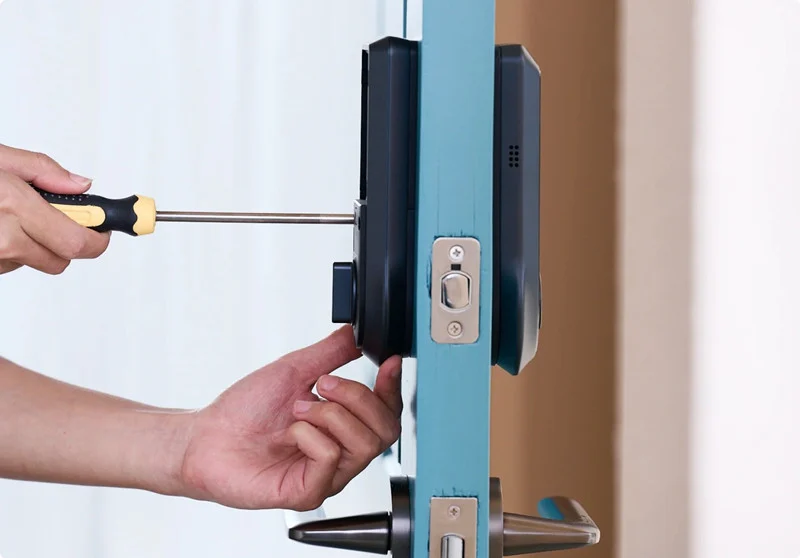
This article walks you through how to set up electronic door lock systems in a practical, real world way, starting from choosing the right model and checking door compatibility, through the mechanical installation, to connecting the lock with your phone and configuring secure user codes. The focus is on clear explanations, long term reliability, and security best practices, so that homeowners, landlords, and small business owners can all follow the same professional grade logic. By the end, you will not only know how to mount the lock, but also how to think about access control, user roles, and ongoing maintenance, which is exactly what modern security requires.
1. Understand What You Want Before You Set Up an Electronic Door Lock
Before you pick up a screwdriver, the most important part of how to set up electronic door lock solutions is to clarify your goals and constraints. Different people buy electronic locks for different reasons. Some want simple keyless entry for a front door, others want detailed logs for short term rentals, and some businesses want to control staff entrances in a more professional way. When you know whether your priority is convenience, security evidence, remote control, or a combination of all three, you can choose a lock and installation method that truly matches your expectations rather than just reacting to marketing terms.
Spend a few minutes listing where you plan to install the lock, who will use it every day, and what problems you are trying to solve. For example, a family with teenagers may focus on tracking arrivals and avoiding lost keys, while a small office might care more about limiting access to certain hours and recording which staff member opened which door. This initial reflection will guide your decisions about connectivity, access methods, and management features, and it is a key part of any professional quality plan for how to set up electronic door lock systems.
2. Choose a Lock That Matches Your Door and Your Use Case
The next step in how to set up electronic door lock solutions is selecting hardware that is both technically compatible and practically suitable. Not every smart lock fits every door. Standard residential doors usually have predrilled holes that match many consumer models, while metal doors, glass doors, or older solid wood doors may need special designs. You should confirm the door thickness, backset measurement, and existing lock type before you purchase anything, because forcing an incompatible lock to fit may create security gaps or mechanical problems later.
Beyond physical compatibility, think about the environment and level of use. A busy shop entrance may need a more robust commercial electronic door lock with higher duty cycle and stronger components, while a bedroom or home office door might be fine with a lighter model. Consider whether the door is indoors or outdoors, how often it will be used each day, whether you need Wi Fi for remote control, and what access methods fit your users best, such as PIN codes, RFID cards, fingerprints, or mobile app credentials. Treat this phase as your foundation. A wisely chosen lock makes every later step of how to set up electronic door lock much smoother.
3. Prepare Your Tools and Check the Manufacturer’s Instructions
Good preparation saves time, reduces errors, and helps you avoid unnecessary stress, especially if this is your first time figuring out how to set up electronic door lock systems. Most electronic locks are designed for straightforward installation, but you still need a few basic tools and a clear idea of each step. Common tools include a suitable screwdriver, a tape measure, possibly a drill for minor adjustments, and the screws and mounting plates supplied with the lock. Some higher end models may also include templates or spacers to help you align the hardware perfectly.
Before you start removing your old lock, carefully read the installation guide from the manufacturer from start to finish, even if you have installed other locks before. Many people run into problems simply because they skip a line about which side of the latch faces outward or the correct order for tightening specific screws. A few minutes spent studying the guide will make the whole process of how to set up electronic door lock solutions more predictable and professional. If the manufacturer offers a video tutorial, watching it once can give you extra confidence.
4. Remove the Old Lock and Prepare the Door
Once you are ready, you can begin the physical part of how to set up electronic door lock hardware by removing the existing lock or handle set. This usually involves unscrewing the interior knob or lever, sliding the old latch out of the edge of the door, and taking off any decorative plates or strike plates on the frame. Take your time and keep any screws or parts you remove in a small container so that nothing gets lost under furniture or outside on the ground.
After the old hardware is removed, inspect the door and frame. Make sure the holes are clean, the wood or metal is not cracked, and the area around the latch is smooth. If there are old paint drips or splinters, lightly clean or sand them so that the new electronic door lock can sit flush. A common cause of performance issues is a misaligned latch that rubs against the strike plate, so this is a good moment to check hinge screws, door sagging, and frame alignment. In a professional approach to how to set up electronic door lock systems, this basic carpentry check is just as important as the electronics.
5. Install the Latch and Mount the Exterior Lock Assembly
Now you can start putting the new system in place. Slide the new latch into the side of the door, ensuring that the beveled edge faces the correct direction, usually towards the direction the door closes. Secure it with the provided screws, but do not overtighten yet in case you need to make small adjustments. This is a key mechanical step in how to set up electronic door lock hardware, because the latch must operate smoothly for the smart features to feel reliable.
Next, position the exterior keypad or reader assembly on the outside of the door, feeding any connecting cables through the prepared hole. Hold the assembly firmly while you attach the interior mounting plate on the inside of the door, lining up the screw holes according to the guide. Once everything is aligned, insert and tighten the mounting screws gradually, alternating between them to pull the assemblies together evenly. When done correctly, the lock should feel solid with no wobble. This stable mounting is essential for long term performance and is one of the most important details in how to set up electronic door lock systems properly.
6. Attach the Interior Unit and Connect Power
With the exterior part secured, you can mount the interior unit, which usually contains the motor drive, electronics, and battery compartment. Follow the instructions to connect any cables between the interior and exterior assemblies, taking care not to pinch or sharply bend them, because damaged cables can lead to intermittent faults that are difficult to diagnose later. Place the interior cover or body onto the mounting plate and tighten the screws until it sits firmly against the door surface.
The next step in how to set up electronic door lock systems is providing power. For battery powered locks, insert fresh batteries of the recommended type, checking the polarity markings carefully. For wired locks, confirm that the power supply is properly connected and rated for the device. Many locks will perform a short start up sequence when power is applied, sometimes including a chime, blinking lights, or a short motor movement. Listen for any unusual noises and check that the mechanism locks and unlocks cleanly when tested manually according to the manual.
7. Align the Strike Plate and Test the Mechanical Action
Even the most advanced electronic door lock will feel unreliable if the door does not close smoothly, so a careful check of the strike plate on the frame is an essential part of how to set up electronic door lock installations. Close the door slowly and observe how the latch engages with the strike plate. If the latch binds, scrapes, or does not fully extend, you might need to adjust the strike plate position or gently enlarge the opening with appropriate tools.
Take time to test the door several times by closing and opening it without using the keypad, just to confirm that the basic mechanical path is smooth. A well aligned door allows the electronic motor to work with less effort, which reduces wear and helps batteries last longer. Many people skip this step and then blame the electronics when the true cause is mechanical resistance. A professional approach to how to set up electronic door lock systems always combines careful mechanical alignment with digital configuration.
8. Set Up the Master Code, User Codes, and Access Rules
Once the hardware works smoothly, you can move into the digital configuration phase of how to set up electronic door lock access. Most locks require you to create a secure master code or administrator credential the first time you use the keypad or connect the mobile app. This master credential should be strong, unique, and known only to the main person or people responsible for security. Avoid simple combinations like repeating digits or obvious dates that are easy to guess.
After the master code is set, start adding everyday user codes or credentials for family members, staff, or trusted guests. Many modern locks allow you to label each code with a name, limit its validity to certain days or time windows, and quickly revoke it if circumstances change. This is where the real value of learning how to set up electronic door lock systems becomes visible, because you move beyond a single shared key and into a structured, traceable access model. For rental properties or small offices, you can create temporary codes for cleaners, contractors, or short term guests, which automatically expire rather than lingering forever.
9. Connect the Lock to the Mobile App or Smart Home Platform
For users who want remote access and real time notifications, connecting the lock to a mobile app or smart home platform is a crucial part of how to set up electronic door lock technology in a modern environment. Start by downloading the official application from the lock manufacturer, create or sign in to your account, and follow the pairing process described in the documentation. This usually involves turning on Bluetooth or Wi Fi on your phone, pressing a specific button on the lock, and confirming the connection.
Once the lock appears in your app, you can test remote lock and unlock commands, view the event history, and adjust notification settings. Some ecosystems allow integration with voice assistants or automation rules, such as locking automatically at night or sending an alert if the door remains unlocked for a certain period. When using these features, keep security in mind and always enable features like two factor authentication on your account where available. Treating your app account as a security asset is an important part of how to set up electronic door lock systems responsibly.
10. Test Real Life Scenarios and Create a Maintenance Routine
Before you declare the project complete, simulate real world situations to verify that the lock behaves as you expect. Ask family members or colleagues to try their codes, approach the door as they normally would, and check whether the door locks reliably when closed. If your lock sends push notifications, verify that you receive them promptly when someone uses a code or when the door is left open. This practical testing phase is often overlooked, yet it is one of the best ways to confirm that you truly know how to set up electronic door lock systems for daily life, not just for a brief demonstration.
Finally, establish a simple maintenance routine. Plan to check battery levels, clean the keypad or fingerprint sensor, and review user codes on a regular schedule, perhaps once every few months. When tenants move out, staff leave, or family roles change, update the access list right away rather than postponing it. Make sure at least one responsible person knows how to perform emergency procedures, such as using a mechanical backup key if available or changing the master code if a phone is lost. With this ongoing attention, your understanding of how to set up electronic door lock systems extends into long term security management.
FAQ About How to Set Up Electronic Door Lock Systems
Is it realistic for a beginner to set up an electronic door lock without a professional
For many standard residential doors, it is realistic for a careful beginner to learn how to set up electronic door lock systems without hiring a professional, as long as they are willing to read the instructions, work slowly, and double check each step. Modern consumer smart locks are designed with clear diagrams and templates, and the required tools are usually basic. However, if the door is part of a fire rated escape route, a commercial building with strict regulations, or a complex access control network, it is wise to consult or hire a professional installer to ensure compliance and safety.
What should I check before buying a lock so that setup is easier
A key part of how to set up electronic door lock systems smoothly is choosing compatible hardware from the start. Measure your door thickness, confirm the size and position of existing holes, and note whether the door is left handed or right handed. Check the product specifications to see which door standards it supports. If you plan to connect the lock to Wi Fi, make sure that your router signal is strong near the door. Taking these measurements and checks before ordering helps you avoid frustration, returns, or unexpected drilling work during installation.
Do I always need to connect my electronic door lock to the internet
Knowing how to set up electronic door lock systems includes understanding what features rely on internet access and which do not. Many locks can operate entirely offline for basic functions such as entering a PIN code or using a card. Internet connection is typically required for remote control from outside the home, cloud based event logs, firmware updates, and integration with broader smart home platforms. If you do not need these advanced features, you may choose to run the lock in a more offline mode, which can reduce exposure to network based risks, provided that you still follow other security best practices.
What happens if the batteries die after I set up my electronic door lock
Most battery powered locks are designed to warn you well in advance when batteries are low, using beeps, lights, or app notifications. As long as you respond to those warnings and replace the batteries promptly, you should not be locked out. However, it is still important to plan for the rare situation where batteries are allowed to drain completely. Many manufacturers include a mechanical key override, a temporary external power connector, or another emergency method. When you learn how to set up electronic door lock devices, make sure to test and understand these emergency options before you actually need them.
Can several people manage the same lock without confusion
Yes, many households and small teams successfully share responsibility for managing a smart lock, but it requires clear rules. A good practice when you learn how to set up electronic door lock systems is to define one or two primary administrators who control master settings and user lists, while others have limited roles such as using their own codes and reporting issues. Some apps support multiple administrator accounts, but it is still wise to document who changed what and when. Simple internal agreements reduce the risk of accidental deletion of codes or conflicting settings.
Is it safe to integrate my electronic door lock with a voice assistant
Integration with a voice assistant can be convenient, for example allowing you to lock the door by voice when your hands are full. However, from a security perspective, you should be cautious about unlocking by voice, especially if the assistant can be heard from outside a window or if multiple people have access to the assistant account. When learning how to set up electronic door lock systems in a security conscious way, many experts recommend enabling voice control only for locking and status checks, while keeping unlocking limited to the keypad, app, or physical credentials that require closer control.
How often should I review user codes after setting up an electronic door lock
A good routine for many homes and small businesses is to review user codes and access permissions every few months or whenever there is a change in people, such as a staff member leaving or a tenant moving out. When you first learn how to set up electronic door lock solutions, it is easy to focus on the initial configuration and then forget about long term hygiene. Regular reviews help confirm that only current, trusted individuals retain access and that old codes for cleaners, contractors, or guests have been removed. Treat this review as part of your broader security check along with testing smoke alarms or reviewing camera systems.
Should I keep the mechanical key after successfully setting up my electronic lock
In most cases, it is wise to keep at least one mechanical key in a safe, secure location even after you have fully learned how to set up electronic door lock systems and feel confident in their reliability. The mechanical key acts as a last resort backup for unexpected situations, such as damage to the lock electronics, a major power issue, or a forgotten master code that cannot be recovered easily. Store this key in a place that is protected from casual discovery, and ensure that only the main decision makers know where it is kept.
When you follow a structured process for how to set up electronic door lock systems, combining careful hardware installation, thoughtful configuration of access rules, and ongoing maintenance, you transform a basic door into a smarter, more secure, and more convenient entrance. Whether you are protecting a family home, a rental unit, or a small business, this investment in planning and setup will pay off every time you unlock the door with confidence instead of worry.

