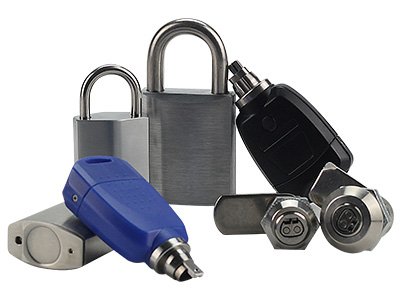
To enjoy our complete set of services, you need to use locks, keys, card readers, and intelligent management system platform. Theintelligent electronic lock (padlock, cabinet lock, CAM lock) is embedded with the standard electronic lock cylinder, which is a high-integrity intelligent lock with information task management function. The cylinder components are made of stainless steel and have artificial intelligence properties that traditional mechanical locks do not have. The lock can be set after installation according to the needs of the free match open permissions.
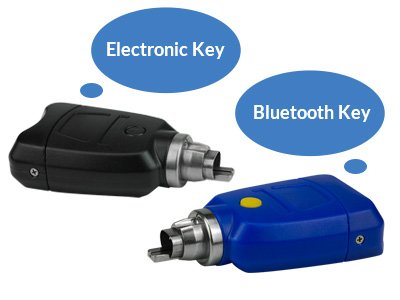
Electronic Key
Electronic key is the application core of the entire smart electronic lock, with the unique 64-bit ID identification code in the world, more reliable, more secure. Keys are encrypted electronically and cannot be copied. The user key has a built-in battery that can power and operate the smart lock. The electronic key opens the corresponding door lock through the software, which can collect and save the operation record of each lock.
Simultaneously carries on the data interaction, the generation, the storage real-time information function. The electronic key can also be used to set the system code, collect the lock number and report the loss of the key. It should be kept by the administrator with specific authority of the system and used within a limited period.
In addition, Bluetooth key can be used with a specific smart lock APP, which supports real-time uploading of unlock data and temporary authorization of unlock permission. It is more flexible to use and more efficient to work.
Intelligent Lock Management Platform
Intelligent lock management platform supports multi-terminal login, role allocation and management, flexible settings, simple installation, easy to use. Record the real-time upload, manage the background to receive and upload (unlock and lock) data in real-time, effectively manage the field operation information.
How to Work?
Step 1: Administrator Settings
1. Set up the working department, set staff and their permission information.
2. Set the key. The key is connected to the intelligent lock management system of the PC terminal through a specific card reader, and set the basic information of the key (the key and the card reader communicate through NFC).
3. Set the lock of the basic information and location information.
Step 2: Install the Lock
Smart keys can be written to a list of open locks, as well as the date and time they can be unlocked.
Step 3: Assign Unlock Permissions
Smart keys can be written to a list of open locks, as well as the date and time they can be unlocked.
Step 4: Staff Unlock
When the electronic key meets the electronic lock, the lock core is energized and information exchanged to determine whether the key can access that lock core. If authorization is successful, the lock is opened.
Step 5: View Unlock Record
The system is managed by intelligent lock management software. Can generate, export unlock lock records, so that each record has traces to follow, easy to manage.
System Composition
Seven Advantages
1. Multiple locks with one key can reduce project costs and greatly improve security.
2. The unlock and lock records are clearly visible, and the responsibility can be traced back to the individual, which is easy for management personnel to manage and evaluate.
3. Two-way authentication to unlock (lock and key), more secure.
4. No power supply, no wiring, no maintenance, suitable for various environments and extreme weather.
5. Lost keys, malicious stolen, a variety of ways to deal with, security is guaranteed.
6. The authorization management is diversified. Locks can be unlocked during scheduled periods or temporarily authorized.
7. Support seven-day free trial, priority to enjoy our service.
Scroll to Top
Customize Your Security Solution
Upgrade locking system
Secure your assets and boost productivity with Vanma Locks. Speak to our sales team for a customized lock system solution.